
We’re at the final post in our OODA and endpoint triage series where we’ve been talking about using the OODA loop during investigations. It’s time to execute (or “Act”) on the decision that we made so that we can answer our investigative questions about the endpoint or server during incident response.
Let’s get started!
Jump to…
Series Recap
How to Execute
Automation and Planning
Conclusion
Previous Series Posts:
- How to use OODA Loop in DFIR
- How to Observe during Investigations
- How to Orient during Investigations
- How to Decide during Investigations
Series Recap
Our previous series, “Intro to IR,” focused on breaking up larger digital investigation questions (IQs) into smaller investigative questions. It focused on questions such as “Is there evidence of malware persistence mechanisms?” and “Are there suspicious user accounts?”
This series is about making the numerous decisions that need to occur in that process using the OODA loop. OODA is a decision-making model that is natural to many people but also formalized to help optimize processes. It consists of four phases that continue to repeat and provide feedback. The idea is to quickly iterate through them faster than your adversary, enabling you to make decisions and answer your IQs faster than them as well.
There are several other articles about using OODA in incident response, but we are focused at a micro-level on endpoint triage. In other words, the process that we use to investigate an endpoint for an intrusion.
What is OODA again?
OODA is acronym with four repeating phases:
- Observe: Observe the situation using a variety of sources that are available. You will never be able to collect all data before making your first decision.
- Orient: Use your experience and training to make sense of what you are seeing so that you can answer your IQs. Make hypotheses about the answers.
- Decide: Based on your goals, orientation, and timing needs, decide on what action to take and when. Actions could include testing a hypothesis about the current state (i.e. get more data) or trying to change the predictions about what will happen next (i.e. thwart a bad guy).
- Act: Finally, the next step is to act based on the previous decision.
The impact of the action (and at all stages) should be observed and fed back so that a new orientation can be made and another follow-on decision and action.
Here is graphic focused on endpoint triage with details that we’ve covered so far:
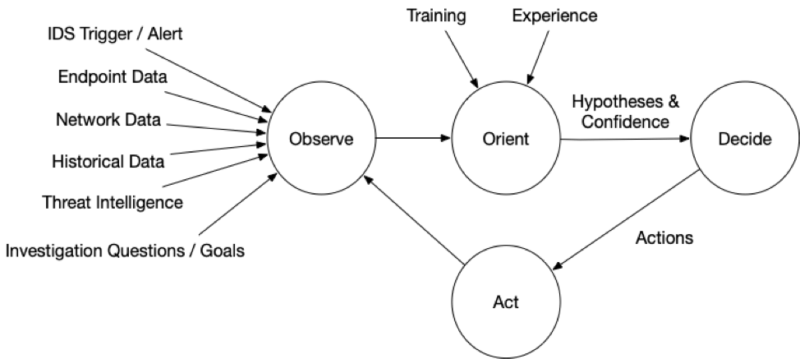
How to Execute During Investigations
The mechanics of acting depend heavily on your infrastructure and tools. So, this discussion is going to stay at a fairly high level.
There are several categories of possible actions, including:
- Get More Host or Network Data: Perhaps no conclusions can be drawn yet with high confidence and the action is to get more data via more collections or searches. The techniques and requirements are the same that we outlined in the “Orient” article , and require you to have sufficient endpoint visibility
- Research: Sometimes it’s not bits and bytes that you need, but rather it’s more information about a threat, what a given computer is used for, or what role a user has in an organization. This process depends largely on your organization, how device management is performed, and what access you have to company roles
- Isolate: If it is believed that the system poses a threat to the enterprise, you may choose to isolate it from the network. This can happen by either disabling network adaptors and unplugging, or blocking network traffic to and from it. Your ability to do this depends on your remote access to the endpoint and the types of network gear you use. Of course, once you isolate it, you may not be able to get more data from it (but you should have already considered that during the Decision phase).
- Remediate: At various points in the process, you may want to take action to take capabilities away from the attacker. These can include changing passwords on accounts that have been compromised or removing malware from systems. Some organizations will try to surgically remove malware and hope they’ve gotten it all. Other places will simply rebuild a new computer from scratch. Of course, remediation only works when all vectors are blocked. If malware is removed, but they still have credentials, they can reinstall. If they lose an account but still have malware, they may be able to get new password hashes.
There isn’t much to discuss here regarding Act’ing, since you should already have evaluated the feasibility and impacts of the action during the previous “Decide” phase.
Now, you just need to do it.
Automation and Planning
Given that the original goal of OODA was speed so that fighter pilots could engage faster than their adversary, it’s hard not to keep thinking about automation and planning for the various stages.
| Observe | |
|---|---|
| Technology | Having the visibility tools that quickly collect or search endpoint and network data, and have access to threat intelligence and past data. |
| Training | Knowing what data is important to observe based on previous attacks. |
| Documentation | Knowing what data exists in your environment that you are able to observe. |
| Orient | |
| Technology | Having automated tools to score data and integrate with threat intelligence. |
| Training | Knowing what suspicious and bad data look like and what often happens during attacks. |
| Documentation | Knowing what is normal in your environment, so that you can consider alternative hypotheses in your organization. |
| Decide | |
| Technology | Having tools that give you the largest number of possible actions, including getting more data or remediation. |
| Training | Knowing what actions are possible and their risks. |
| Documentation | Having documented procedures (i.e. playbooks) that outline what responders are expected to do in common situations. This allows them to quickly act on that playbook without needing to consider alternatives. |
| Act | |
| Technology | Same as above for “Observe” and “Decide.” You need to have infrastructure that gives you visibility and remediation capabilities. |
| Training | Knowing how to perform the actions. |
| Documentation | Knowing what approvals are needed for different kinds of actions (such as isolating a computer). |
Incident response relies on lots of technology and tools, but training and documentation are also critical to making sure you can execute quickly and efficiently.
Conclusion
We’ve now completed this series on using the OODA process during an endpoint investigation, and we hope that it has helped as a way to frame and organize your process. Training becomes just as critical as having the right visibility and analysis software to ensure the process is fast and thorough.
Cyber Triage provides visibility into endpoints using its Collector and uses Automated Analysis to help investigators make decisions faster. You can try Cyber Triage free for 7 days.