Cyber Triage 3.17.0 is out and allows you to integrate AI into your investigations to reach conclusions faster. You can now use Claude as a read-only AI assistant to enrich the Cyber Triage results, generate reports, and find new clues.
This is our first integration of GenAI into Cyber Triage and in this post we’ll talk about MCP Servers and what you can do with them.
You can download the 7-day eval from here.
We’re doing a joint Autopsy and Cyber Triage webinar on April 30 to talk about MCP and how to use these features. Sign up here to see these features in action.
Claude Desktop + Cyber Triage via MCP
The core feature added to Cyber Triage is an MCP server. This allows an MCP Client, such as Claude Desktop, to connect to it and query data. We did a blog post about MCP earlier in the week, but the simple concept is to think of MCP as an REST API that can be called by LLMs to get data.
The data flow looks like this. You run Claude Desktop and Cyber Triage on your computer and Claude Desktop can then talk to Anthropic servers or LLMs in AWS/Azure/GCP, etc.
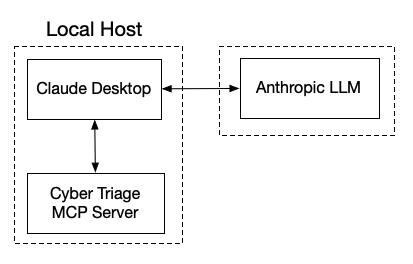
You can actually use any MCP client and the LLM servers can be in any location. We just focus on Claude Desktop because it’s the most popular right now.
Talk to Your DFIR Data
Once connected, you have the power of an LLM to help you investigate faster:
- Talk to your data: Because you’re just asking questions (not writing queries), any analyst can interrogate the data like an expert.
- Easily enrich findings: Use AI to add context to Cyber Triage’s scored results with any additional threat intel and analysis.
- Turn results into reports: Quickly generate new timelines, executive summaries, and full investigation reports directly from Cyber Triage results.
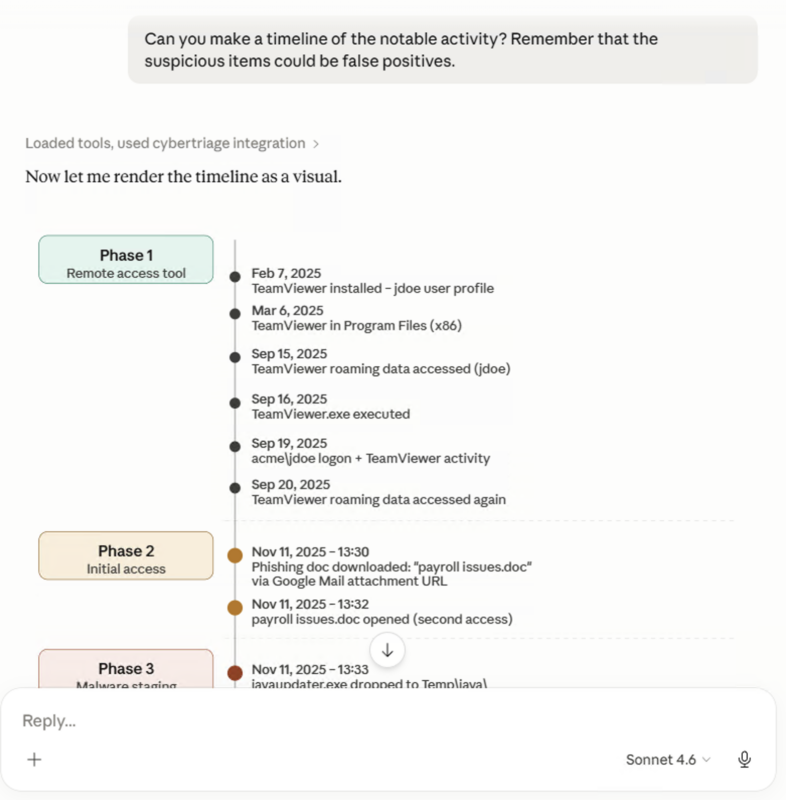
For example, you can ask to make a timeline of notable activity:
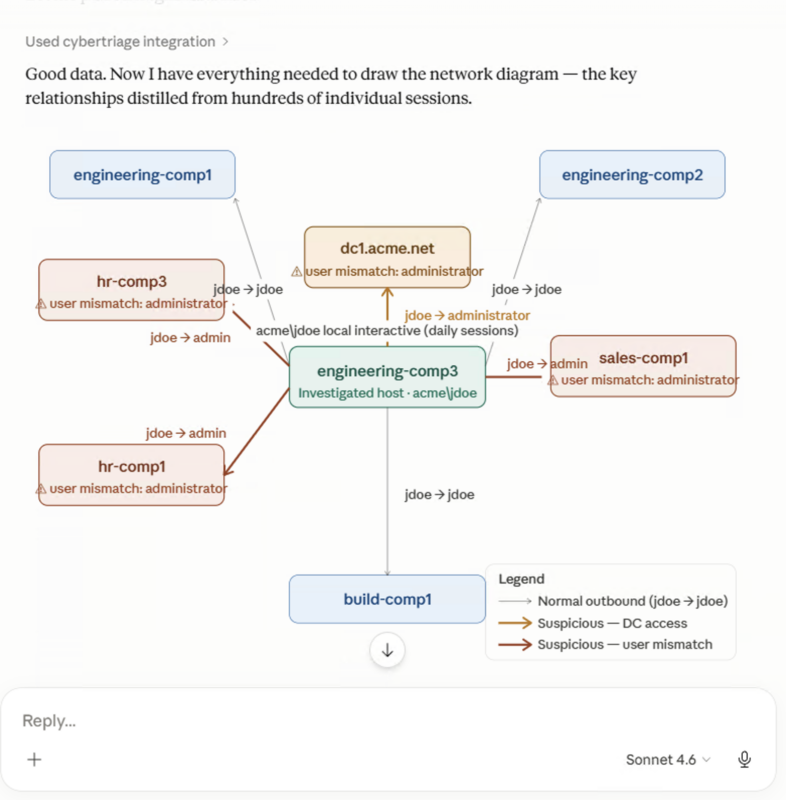
Or to make a network diagram of the inbound and outbound logons:
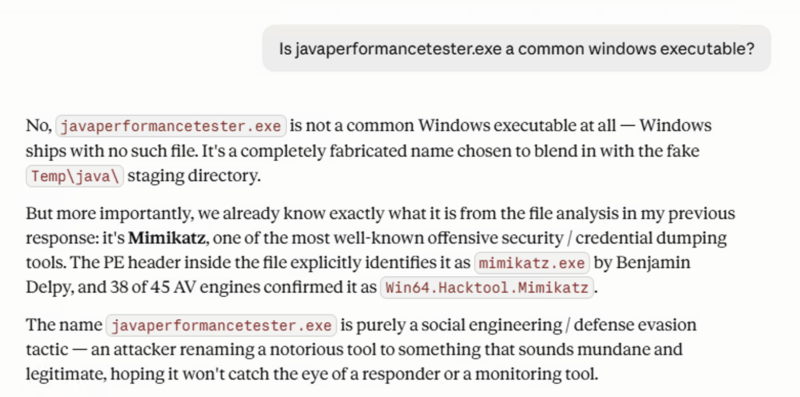
Or enrichment questions, such as if a file name is common:
DFIR + AI Considerations
AI on some days is amazing and on other days is super frustrating. We’re taking incremental and transparent steps to incorporate GenAI into Cyber Triage.
For this release, the important things to note are:
- Scoring: We are not using GenAI for scoring. Our deterministic approaches are still used to score artifacts as bad or suspicious.
- Read-only: Claude cannot change any data in the Cyber Triage database. You do not need to worry about it introducing hallucinations into your data sets.
- You’re the driver: You choose when to use GenAI or not and that means you know what was made from GenAI and what wasn’t.
- Bring Your Own AI (BYOAI): You are not using our models. We don’t see your data. The data is going to servers that you have an agreement with (either on Anthropic servers, cloud, or internal).
Quick Setup Video
A short video shows how to set it up and use it.
Enterprise Feature for Everyone
This feature is one of the integrations in the Enterprise tier of Cyber Triage, but we are making it available to everyone through Sep 1, 2026.
GenAI is changing so rapidly, and everyone is experimenting with it. We want to encourage the discovery and learn with you about what kinds of prompts work well and what doesn’t.
Try it Out
You can download the 7-day eval copy from here.
You can also learn more about AI and DFIR from the series that we are running: