
Generative AI (such as Claude and ChatGPT) is changing how everyone does their work and for digital investigations, it’s important to understand how it can access your data. This is your overview!
Investigations have massive amounts of data, and it’s not always obvious how you can apply AI tools to it. We offer MCP servers for Cyber Triage and Autopsy so that Claude Desktop and other tools can access the data.
This post is the first in an “AI and Investigations” series and we’ll talk about ways to get your data into the GenAI system.
UPDATE: The follow on post was about MCP servers.
Problem: GenAI Needs Access to Your Data
To use GenAI in your investigations, you’re going to need to get some of your data into the GenAI system. You’d run out of tokens very quickly if you tried to send an entire disk image into it (and it probably wouldn’t know what to do with it unless you’ve customized it).
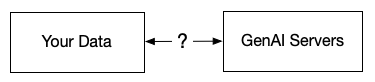
Copy and paste is an obvious option. So is uploading a single file. This post dives into other methods that are tighter integrations with direct access to your data.
Spoiler: 3 Ways to Access Collected Data
There are currently three common ways to provide GenAI access to your investigation data:
- Copy and paste or upload files.
- Directly accessing files
- MCP servers
Read on for more details…
Basic GenAI Architecture: Clients and Servers
[From what I can tell, I made these terms up in this context.]
I find it important to think of the GenAI data flow as client and server, though this terminology is not as common as I thought (which is why I ended up making up these terms…).
- A GenAI Server is a service that runs the LLM and processes the request. Examples include:
- GenAI vendor servers, such as Anthropic or OpenAI servers.
- Cloud providers, such as AWS Bedrock, under accounts owned by a vendor or the end user.
- Self-hosted servers
- A GenAI Client is how a user or application interacts with a GenAI Server. Examples include:
- A chat interface on a website (such as ChatGPT or Claude websites).
- A desktop application from a GenAI company (such as Claude Code, Claude Desktop, or ChatGPT Desktop).
- An application not from a GenAI company that has an integrated client that calls the GenAI Server APIs.
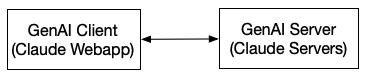
Here’s a simple example:
You log into the claude.ai web application. The client that you are interacting with is on the Claude web server and it is talking to Claude servers in some data center. In this example, you have nothing running locally.
The Many GenAI Client and Server Combinations
There are many combinations of where GenAI Servers and Clients exist. It all depends on what tools you are using and what decisions you’ve made about servers.
Here are some examples that use Claude names (with a graphic below):
- You can use the web app version on claude.ai. In this setup, both the server and client are on Anthropic systems. You have nothing local on your laptop.
- You can run Claude Desktop (or Code) on your computer, and now the GenAI client is local, but the server is still on Anthropic systems. Spoiler: This now allows the client to access your local data.
- You can use a web app (such as an e-commerce site) that has a co-pilot or other GenAI integration. In this setup, the GenAI client is on the e-commerce site, and it could end up talking to a GenAI server on Anthropic systems.
- A company can also license its own Claude Servers or use models built into AWS and have everything in its environment.
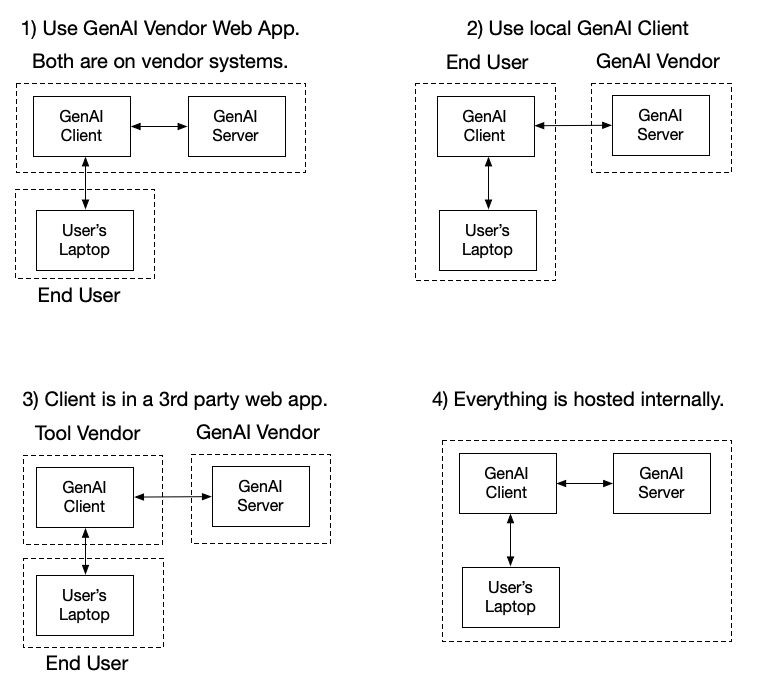
There are many other examples as well. The key thing to think about is where the GenAI client is located and what it can access.
Who Can Access Your Data?
Let’s get back to the main point: How does your data ultimately get to the GenAI server so that it can answer questions?
With the client and server architecture, let’s first identify how your data can get into the system:
- GenAI Client copy and paste: The easiest (but not scalable) way to get data into a client is to be able to copy and paste it in or upload a file. We’ve had many customers take our Cyber Triage JSON and copy it into a ChatGPT or Claude web app interface. No integrations required.
- GenAI Client integrations: The scalable way to get your data in is to have the GenAI client have an integration with your data sources so that it can query it and then send the needed data to the server. There are several ways to do that, and we’ll cover that in the next section.
- GenAI Server integrations: Lastly, it is in theory possible for the GenAI Server to directly access data it needs. For example, they often query the internet for public data. But, most hosted providers do not allow you to directly integrate your private data sources with the server. This is more typical with self-hosted approaches.
One important thing to recognize is that if you are using the web services from Claude or ChatGPT and the GenAI client is on their servers, there are no integrations with your data. You can only copy and paste. You need to have a local client (such as Claude Desktop or Code) to directly access your data.
The rest of this post focuses on the GenAI Client integration, because that is the common way to do this.
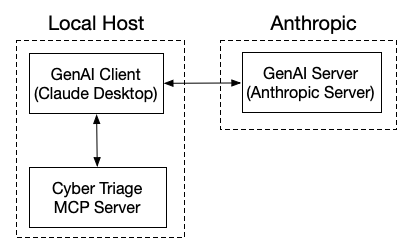
For example, this is what it looks like to have Cyber Triage and Claude Desktop integrated. Claude Desktop (i.e. the GenAI Client) can talk to both the Claude servers and Cyber Triage. It is the middleman to get the data that the server needs.
Tools: How GenAI Clients Access Your Data
Because the client is how you get data into the process, let’s look at the ways to do this. The options depend greatly on which client you are using, and the list of options changes rapidly.
The generally accepted concept as of early 2026 is that clients have access to “Tools.” These tools are used if their description looks like it will help answer the question.
For example, a description of a tool could be “shows users on the system.” And if you enter a prompt that asks about “users,” then the GenAI system will likely use that tool to see what it knows about users.
The tools can use a variety of ways to access data. Common examples include:
- MCP over HTTP: Model Context Protocol (MCP) introduced this in Claude in 2024. It is a protocol that operates via HTTP over the network and allows a GenAI client to talk to an MCP server and get data from it.
- MCP over STDIO: Same protocol as “MCP over HTTP,” but no network is required. The GenAI client launches a local MCP server and interacts with it using STDIO. This has become more popular recently because it doesn’t require opening network ports.
- Direct file access: A local GenAI client can read files from the file system. This is what Claude Code’s initial power was because it was designed to operate on source code in a folder. You can also use it to access collected forensic artifacts.
- Command-line tools: A tool can invoke a local command-line tool to process data and return the results.
- REST APIs: A tool can call into the REST API of a server
- ….
Common Methods for Digital Investigations
Getting back to the original spoiler, the ways for a digital investigator to get data into the GenAI servers are:
- Copy and paste or upload: You can do this with the web apps and have complete control over what data they see. You have no local client. This works well for airgapped networks. There is zero risk that the original files will be modified.
- MCP: If your tool vendor supports it, you can integrate a local GenAI client with it and ask questions. If designed well, the tool descriptions will help the AI know how to interpret and analyze the data better than just uploading raw data and hoping for the best. This will also likely use fewer tokens than uploading all the data because the questions you ask may need only a subset of it, and the tools will return only that subset.
- Direct file access: If you have a set of files (event logs, process listings, reports, etc.), you can put them in a folder and launch a client like Claude Code that can read them and answer questions. This is essentially a variation of uploading those files via the web app. The main value is that you can sometimes configure the client to do certain things (i.e., a Claude “skill” about how to investigate for persistence).
Read-Only or Write Access
As you think about the previous 3 approaches, it’s important to recognize which could modify your data. Preserving evidence integrity is super important with investigations!
- Copy and paste or upload: This is the safest way to ensure the original doesn’t change. The GenAI client never has access to your original data.
- MCP: This will all depend on how your vendor built it. They could expose ‘Tools’ that allow the GenAI Client to add or change data. You should understand if that is possible if your use MCP.
- Direct File access: This will most likely be able to change your files, especially if the client is something like Claude Code that was designed to edit source code. If you use this method, make sure you have a backup copy of the files and consider adding to your prompts to never update the files.
Autopsy and Cyber Triage MCP
As we mentioned above, we have released Autopsy and Cyber Triage MCP servers. They use the “MCP over STDIO” approach.
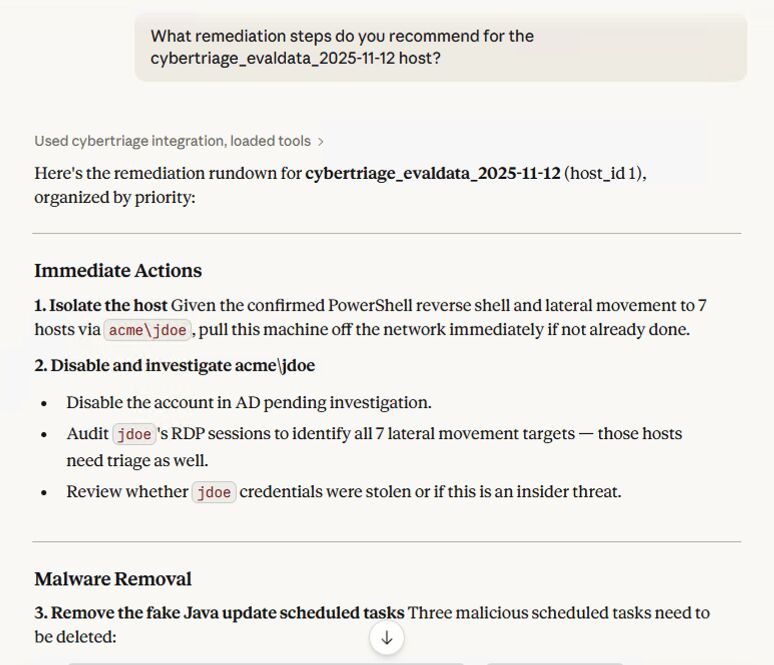
When you launch Cyber Triage or Autopsy and have the feature enabled, you can connect Claude Desktop to it and type in a question. Claude will get the tool list from Autopsy or Cyber Triage, decide which to use, get the data, and then use it to answer the question.
Next Steps
If you like our content and want to see Autopsy and Cyber Triage MCP when it is released, sign up for our email list below. We’ll continue this AI series, and the next post will dive deeper into MCP (post is here).