
In GenAI systems, “skills” are how the LLMs know how to do your specialized, repetitive tasks. For example, in a digital investigation, skills can specify how to look for lateral movement, reverse engineer an executable, or review text messages.They are how you can make generic LLMs become more specialized AND REPEATABLE.
Continuing on our Intro to GenAI for DFIR series, this post dives into skills. Anthropic was the first to use this term and their structure has become an industry standard. But the concept exists in all LLMs, just under different names: ChatGPT calls them Custom GPT and Gemini calls them Gems.
The main goal of this post is to highlight:
- What does a skill do?
- How you use them?
- What do they look like?
- Where are they stored?
Problem: Generic LLMs Needs Instructions on Specific Tasks
Most GenAI systems are generic and trained on vast amounts of data. If you ask them to do something, they will try lots of things and often figure something out. But, that’s inefficient if you know exactly what you want done. And, they will end up with different solutions every time.
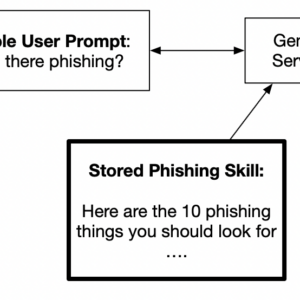
For example, if you often look for evidence of phishing on hosts, you may have specific things you always want to check. You’ll want to communicate those steps so that you don’t get different results each time.
Common reasons for wanting to outline a specific process include:
- Secret sauce: You have a special process
- Determinism: You want to make sure the same series of steps happens each time
- Prioritization: You are doing triage and want to make sure some things are done now. And others are done later.
The ultimate goal is for you to give a simple prompt and have a repeatable process.
Skills: How to Repeatably Direct the LLM
There are three basic options to give direction to the LLM:
- Detailed prompt:You can include the instructions at the appropriate time in your prompt. This requires you to remember to include all of the details. For this to be effective, you’ll probably end up maintaining a text file that includes the prompts you want to copy and paste in. This is tedious and error prone.
- MCP system prompt: An MCP server can optionally provide prompts, such as “/triage_endpoint” that instruct the LLM what to do. You need to build or obtain an MCP server to do this.
- Skills/Gems/CustomGPT: This uses the GenAI platform infrastructure (either server-side or client-side) to store the instructions. These are either triggered because you explicitly call out the name of the skill or the LLM infers that you want to use it. You can make these by hand.
All 3 of these are functional equivalents. They provide natural language instructions to the LLM. The difference is only on where the instructions are stored and how the LLL learns about them.
We’re going to focus on skills because they are the most powerful for a user.
NOTE
The LLM may still decide to do things differently each time. But, a skill will help make it a bit more consistent than not having one.
Skills vs MCP in DFIR
Last week, we discussed MCP because we released the Autopsy and Cyber Triage MCP Servers. Skills and MCP servers work closely together.
- MCP: Provide LLMs with access to data.
- Skills: Direct LLMs how to analyze the data.
Some things that could be useful to build as GenAI skills:
- Reporting: How you want data to be presented and structured.
- Enriching: What additional information you’d like have brought in.
- Correlation: Ways you want to have data correlated between cases or hosts.
What’s Inside A Skill
A skill can be as simple as a single SKILL.md MarkDown file or can be a ZIP file with the SKILL.md file and supporting files.
The SKILL.md file has this structure:
- Name: What is the skill called. No spaces.
- Description: Paragraph that describes when the skill should be used. The LLM is going to use this to decide if the skill is relevant to a prompt.
- Body: The detailed set of instructions that you want performed when the skill is invoked.
If needed, the skill can also contain folders with:
- Scripts: Python or similar scripts that the LLM can run (doesn’t work in all deployment scenarios)
- References: Text files that can be referenced in the skill body and get loaded as needed. Usually more details, but that is not always needed.
- Assets: Non-text files that can be referenced in the skill body and are used as needed.
When you give the LLM a prompt and it has skills installed, it will:
- Review the skill descriptions to see if any are relevant. If one is, then it loads up the body of the skill to get the specific instructions.
- If no skill matches, then it will then review the tools to see if any of those are relevant.
At least, that is the order that Anthropic uses.
The design of loading only the skill descriptions ahead of time will save you tokens. The lengthy body of the skill is loaded into your context window only if the description matches.
For a really in-depth of review of skills, check out:
You can also have Claude make a skill for you via a prompt and you’ll never need to actually look at the structure!
Example Skill
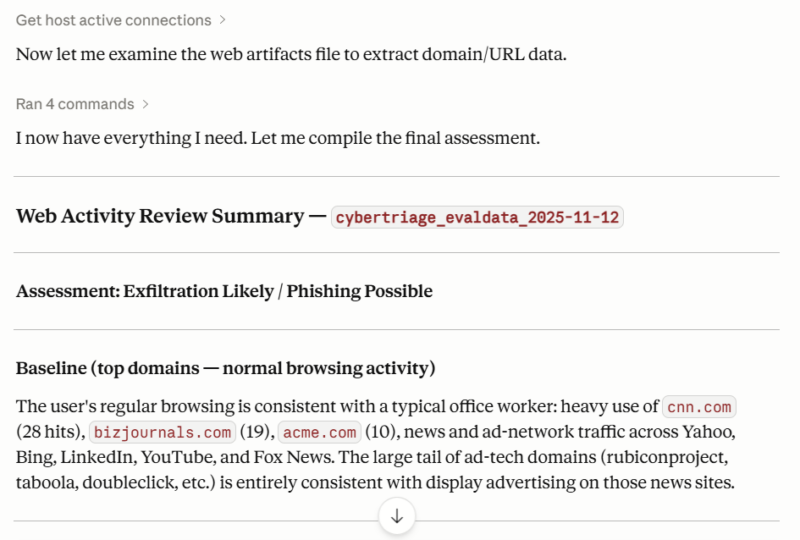
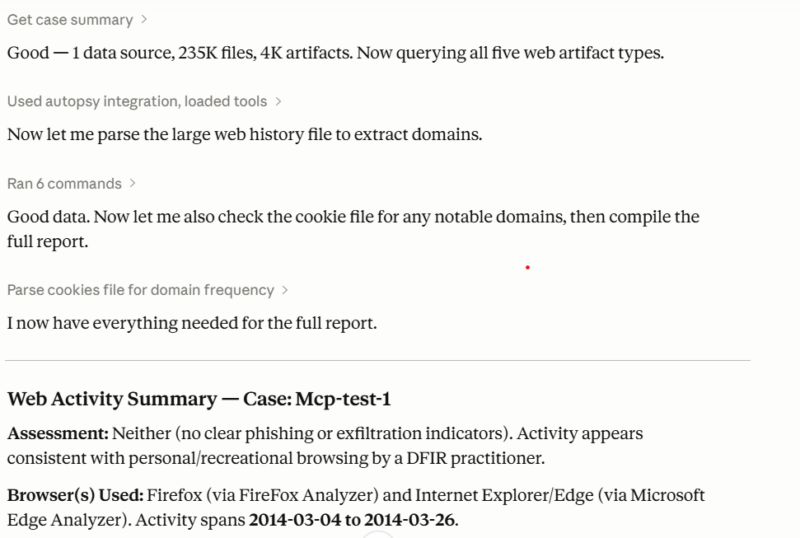
Let’s look at a simple DFIR skill with examples for both Autopsy and Cyber Triage about looking at web activity. Maybe it’s to look for phishing, data exfiltration, or suspicious communications.
- Collect the web artifacts: Query the MCP tools for the parsed web activity (history, downloads, cookies, etc.).
- Build a frequency table: Map out what sites were most frequent for the user and which were more rare.
- Identify recent and low-volume domains: What domains were new and only a few visits..
- Identify suspicious domains: What domains look lie they could be for data exfiltration or phishing.
- Make a report: List out suspicious domains and what the normal activity of the user was.
This requires none of the supporting folders, just a single SKILL.md file. You can find examples of this skill here:
Here are some screenshots of using this skill within Cyber Triage on the evaluation data:
And the skill on Autopsy with one of our older, public training data sets:
Where Skills Are Stored
Because GenAI is changing so rapidly, one of the confusing parts is where each platform stores these SKILL files and that impacts how you can use them.
For example, if you are using Anthropic servers, then:
- You can store a skill within your claude.ai account (i.e. on its servers), and it will be used by both the web app version of Claude and Claude Desktop. But, the web app version of Claude doesn’t have access to your MCP server, so that doesn’t really help you for DFIR.
- You can store a skill in your “~/.claude/skills” folder and that is used by Claude Code, but not Claude Desktop (though I’ve seen references to how you can get it to work, but it doesn’t by default).
But, if you use Anthropic models on the AWS Bedrock servers, then:
- Claude Code can still have its skills in a local folder.
- AWS has their own way of storing skills using their agent infrastructure.
The important concept for this post is the idea of skills. And then you’ll need to figure out how your specific infrastructure can use it.
Simple Way to Experiment Setup
If you want to experiment with skills, then an easy way to do that is:
- Setup Claude Desktop
- Configure it to use the Autopsy or Cyber Triage (7-day eval link) MCP server
- After Claude Desktop can connect to the MCP server, tell it what you want the skill to do. It will make it for you.
- Try it out in a prompt.
You can also use these 2 sample ones that I listed before (Autopsy and Cyber Triage).
Improving Your Skills
The basic idea of an AI “skill” is simple. It’s like you giving a really long prompt and instead of you maintaining a text file to copy and paste, the LLM manages which prompt to use when. They are how you and vendors make generic LLMs specialized.
I hope you found this useful. If you like this content, sign up below. If you want to try Cyber Triage MCP server, then you can download a 7-day trial here.
Next up in our Intro to GenAI + DFIR is about agents and how they essentially bundle skills and MCP.