
As we all experiment with AI prompts and DFIR data sets, here are 3 that I’ve found useful when using the Cyber Triage MCP integration to make sure all of the evidence is found.
These prompts will work on other tools too, but the benefit of Cyber Triage is that it provides the AI with a starting point of bad and suspicious artifacts. It is not letting the AI start with hundreds of thousands of events and letting it get too distracted with false positives.
Prompt 1: Impact of Bad Items
At some point, you’re going to have a list of bad events, logins, processes, etc. Either from manual analysis or automated scoring. You need to work backward from those items to figure out what had to be true for them to happen. For example: Did this event require admin privileges?
Here’s a prompt you can use for that:
For each bad item found on the host, analyze what prerequisites must have been in place for that item to exist or execute. Consider if it required compromised credentials, administrative access, or downloaded tools. Consider if a process was launched by a script or a user. For each dimension, state if it must have been true or not required. Cite the specific Cyber Triage evidence that supports your conclusion, and flag any dimension where the evidence is absent and further investigation is needed. Cite websites that provide supporting information.
The important elements:
- Have it consider specific examples of what you care about (admin, scripts, tools).
- Have it cite artifacts for you to verify.
- Have it cite external sources for you to verify.
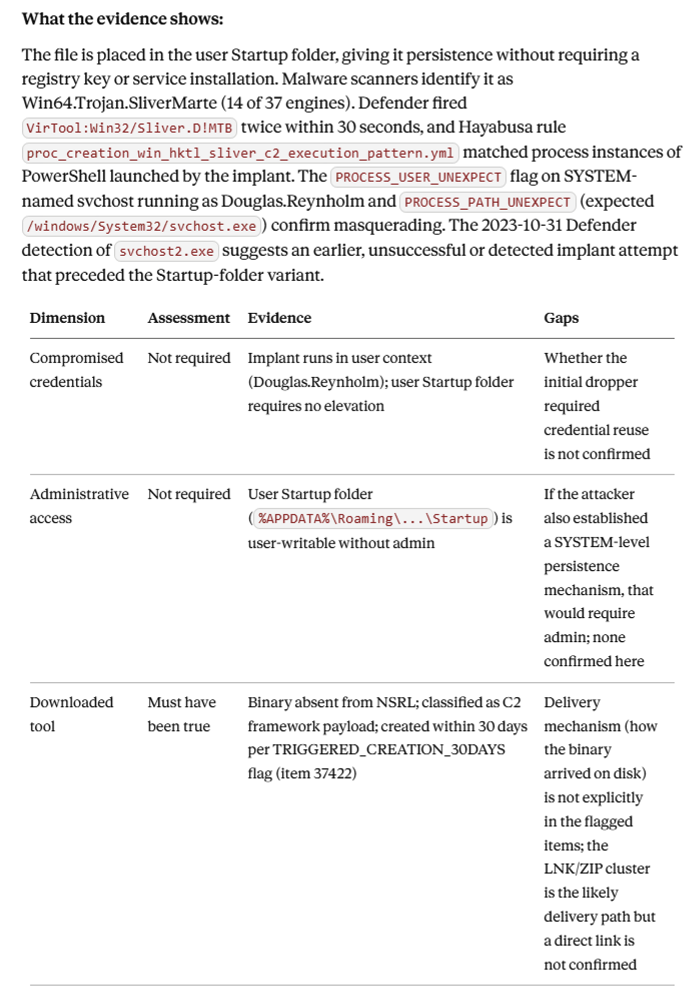
Here is an example from a ransomware data set. Claude grouped the bad items, and this is its output for the Sliver implant that was found:
Prompt 2: Context of Suspicious Items
You’ll also have a list of suspicious items that could be related to an attack or not. These can come from a manual review or an automated scoring tool like Cyber Triage.
For these, you need a prompt that can help make that decision based on:
- The LLM’s knowledge about attacks and threat intelligence
- The other bad and suspicious items and if they tell a plausible story (this assumes the bad items are accurate)
Here’s a prompt that you can use for that:
For each suspicious item found on the host, review them, group them, and propose if they are related to the attack or a false positive. Consider if they are in the same location or in similar time frames as other bad items. Consider if they match TTPs of threat actors associated with the bad items. Cite websites that support your conclusion.
The important elements:
- Have it group them to consider them as a whole.
- Have it focus on things like locations, timing, and TTPs.
- Have it cite external sources for you to verify.
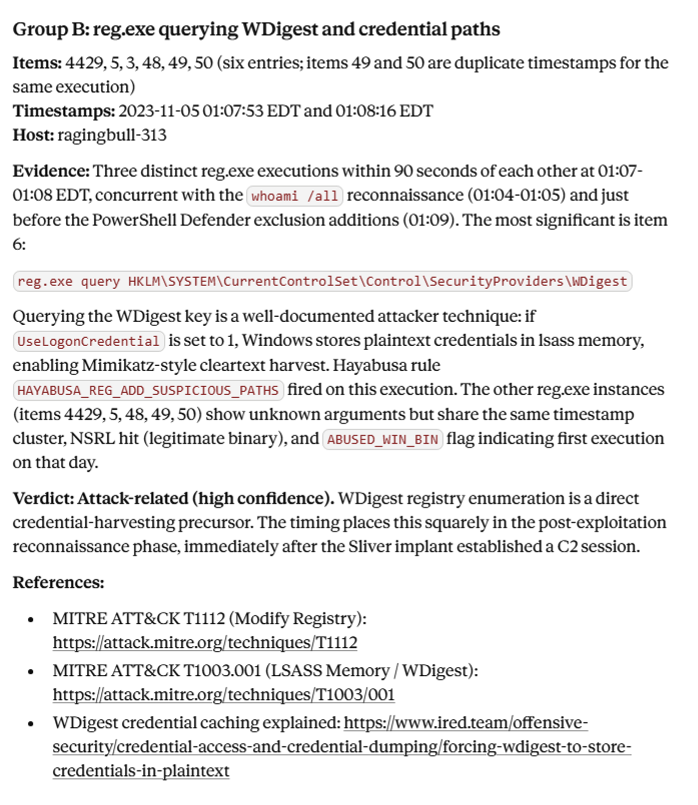
Here’s an example from Claude’s analysis of our data set that highlights a set of suspicious registry queries and recommends making these bad based on TTPs and its timing with the Sliver implant.
Prompt 3: Challenge the Narrative
After you have your set of bad items, it’s important to challenge the story to make sure it makes sense. Is it consistent? Are there gaps?
Here’s a prompt you can use for that:
Review the bad items and identify any that are inconsistent with the dominant attack narrative, such as timeline conflicts, redundant capabilities, unexpected locations, or tools that don’t match the threat actor behaviors. For each anomaly, assess whether it suggests a second threat actor, a pivot in the attacker’s approach, or a false positive.
The important elements:
- Provide examples of what makes the narrative inconsistent.
- Provide examples of causes of inconsistencies.
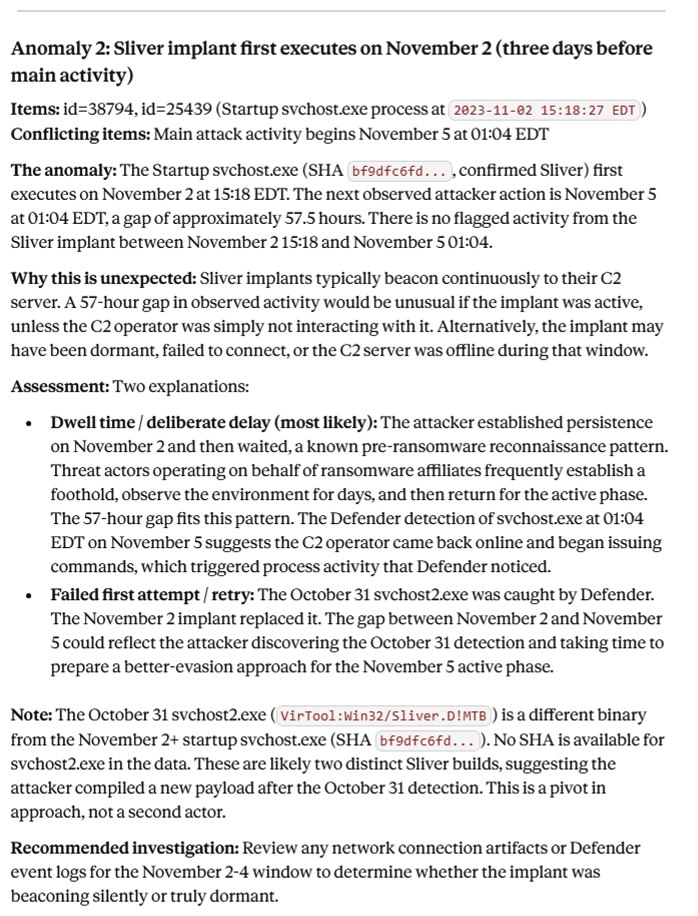
Here is an example expanding on the Sliver detection that highlights the dwell time, and that it should be investigated to see if there was in fact activity in the 3 days.
Good Prompts and Good Data are Important
Using the right prompts at the right time can make your investigations faster and more complete (but you still need to verify the AI output!). These prompts work best when you have a starting set of bad and suspicious items.
If you don’t have an automated way of getting bad and suspicious items, you can try Cyber Triage’s scoring and MCP server. A 7-day eval can be found here. Cyber Triage scores your forensic collections and telemetry to give you a starting point for your investigations.
Good prompts need a good starting point. That’s what the scoring gets you.