
AI agents are one of the ways to extend an LLM to answer your DFIR prompts. They’re a lot like MCP tools and skills and you can achieve the same goal (investigating phishing, for example) with any of the three. It’s an architectural decision with pros and cons either way.
“Agent” is also an extremely overused word right now, so the topic gets confusing fast. I hope to simplify it for you in this post.
As you experiment, remember to submit your wins and failures to our “AI+DFIR: Good and Ugly” challenge.
Basic Definition
“Agent” is hard to define because the term gets used so loosely. The most simple definition is that an AI agent is what runs in an Agentic AI framework.
LLMs call them, pass in arguments, and get a result. They are the microservices equivalent to GenAI architecture.
An agent can be as simple as Python code that adds two numbers that were passed in as arguments. Or, it can use an LLM and have proprietary knowledge embedded in it.
The benefits of using an agent instead of other GenAI capabilities like skills or tools are:
- Memory: It has its own LLM context window (if it uses an LLM). This means that all of its intermediate steps to get to its answer do not clutter up the primary context. The caller of the agent just gets the answer. None of the intermediate steps.
- Parallelism: Agents can be run in large environments and each doing work in parallel. Though, some can also run on your desktop.
- Long running: If you have a job that will run for hours or needs to run every night at a certain time, then agents can be used for this.
- Permission scoping: You can restrict credentials and resource access to be stored in the agent, versus each desktop application.
In general, everything an agent can reason about, can also be done without an agent.
It’s just a form of packaging.
General API of an Agent
While there are several popular agent frameworks out there, the agents have a common public-facing API:
- Name: 1-word name for the agent.
- Description: Natural language description for what the agent can do.
- Arguments: What data needs to be passed into the agent for it to do its work.
You’ll remember these are the same properties that MCP tools and skills also expose. The LLM uses the description to decide if it should use the agent.
Agentic Framework Locations
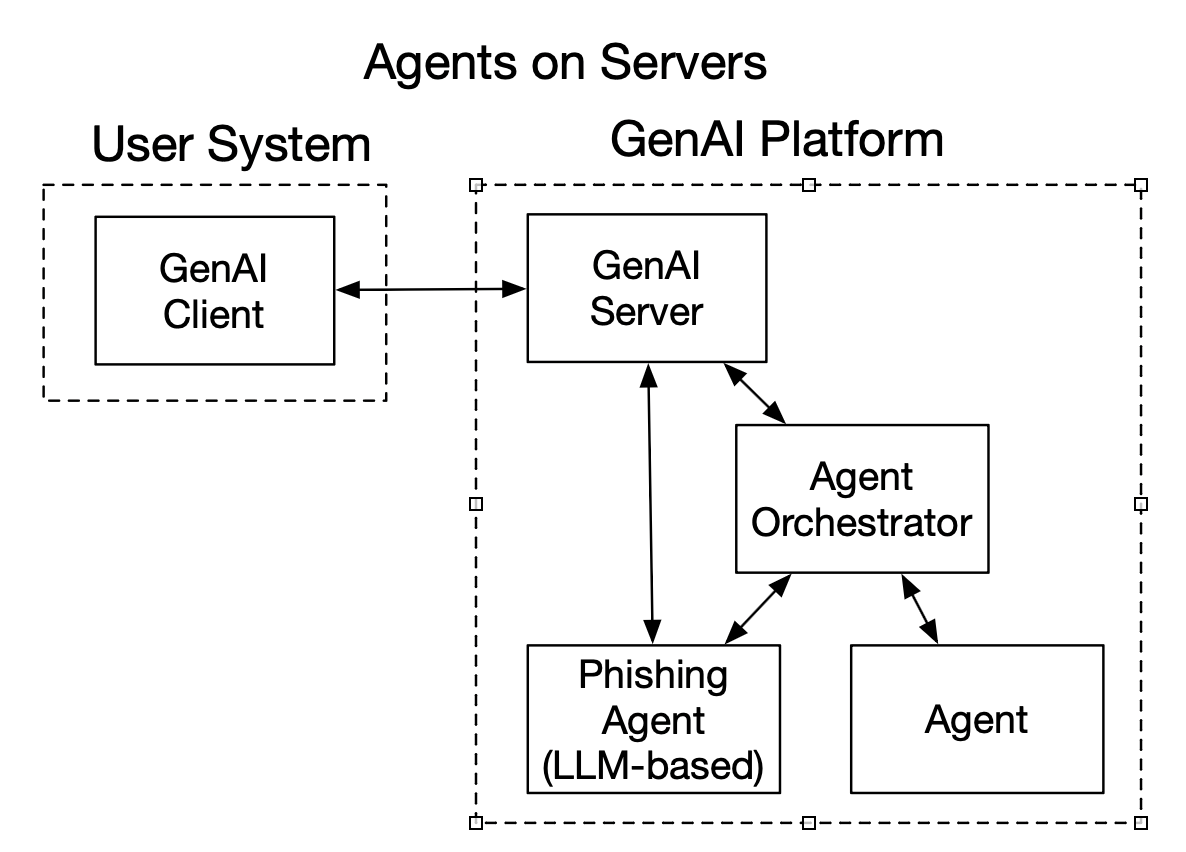
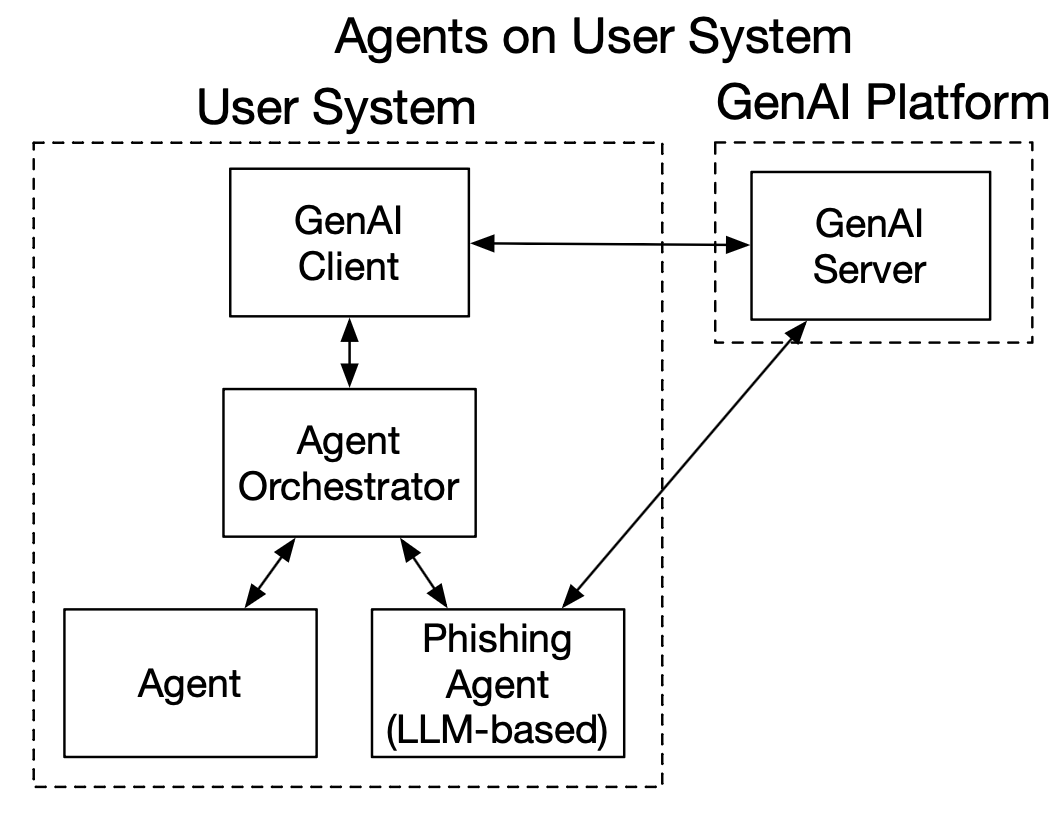
Agentic frameworks can run in both GenAI clients and cloud-based servers.
For example:
- Claude Code has a client-based agentic framework that runs on your computer.
- Anthropic also has Claude Managed Agents that run in their environment.
- There are numerous server-side agentic frameworks (see below).
Threat Intelligence Agent Examples
Let’s look at 2 simple examples to highlight that agents do not need to use AI themselves.
LLM-based Agent
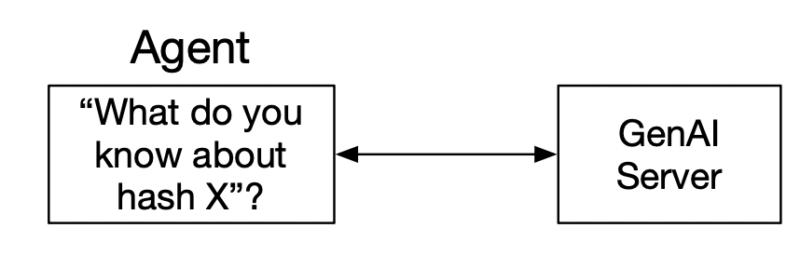
A threat intelligence agent could receive a hash value as input and have internal logic that:
- Connects to the GenAI Server (Claude, LLama, etc.)
- Issues a prompt “What do you know about this hash value: XYZ?”
- The GenAI server returns an answer to the agent.
- The agent returns that answer directly or some other variation of it
This design encapsulates the prompt and context inside the agent.
Deterministic Agent
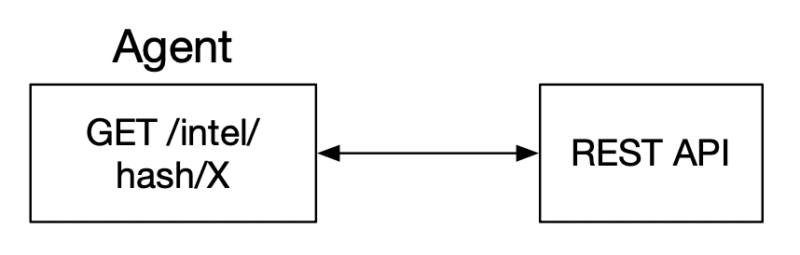
Another form of threat intelligence agent could receive the hash value, but never use an LLM. It’s internal logic could look like:
- Connect to a threat intelligence REST API (or MCP server)
- Issue a query for the hash value
- Return the API results
The main value of this design is that the connection to the threat intelligence platform has been encapsulated.
Agents vs Skills vs MCP Tools
Skills, agents, and MCP tools all have natural-language descriptions that the LLM can use to determine whether they are relevant to a prompt. The LLM could choose any of the 3 that seem relevant.
The differences are really architecture-based, and system designers choose where to implement the capabilities.
| MCP Tool | Agent | Skill | |
|---|---|---|---|
| Primary Job | Return data. Usually deterministic. | Do work. Either deterministic or using an LLM. | Instruct how to do work. |
| Where does it run | MCP Server | Agent framework (on client or on server) | Used by GenAI Server |
| Memory used | It returns an answer. Intermediate data is hidden from the caller. | It returns an answer. Intermediate data is hidden from the caller. | It is used in the primary context memory. |
| Other uses | It can do processing and analysis instead of just returning data (like an agent). | It could do no analysis work and simply return data (like MCP Tools). | Skills can be used by agents to do their work. |
Phishing Example
In our skills post, we talked about a hypothetical scenario where someone had 10 steps they always did for a phishing email investigation. You could perform all 10 of those steps as a skill, MCP, or agent.
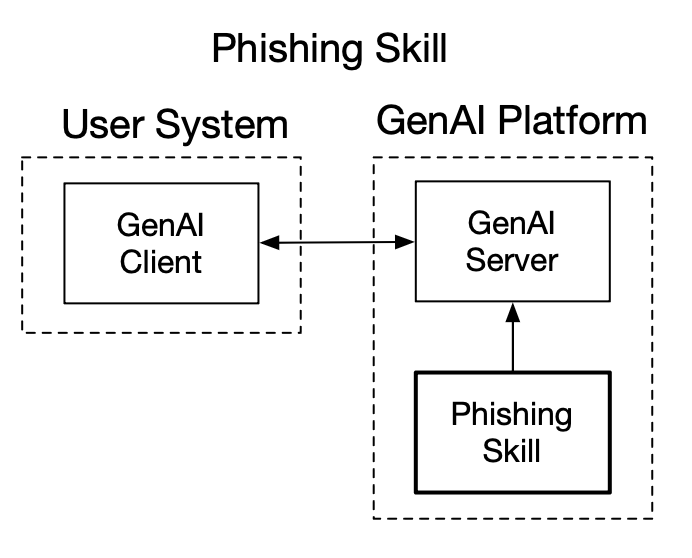
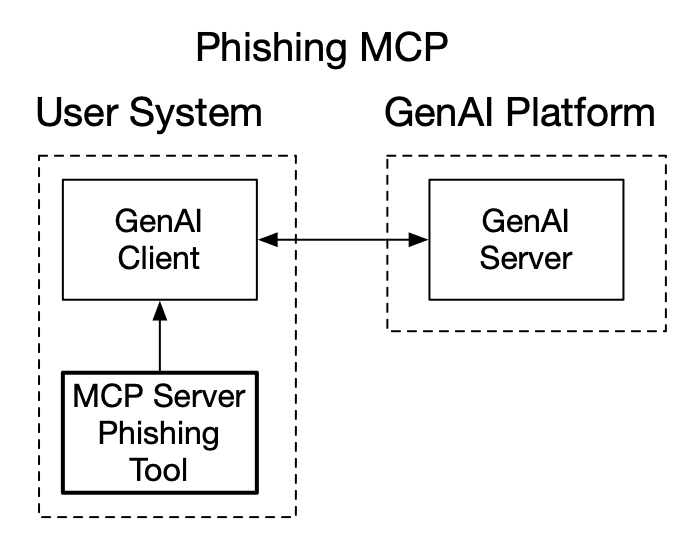
- Skill: The markdown file outlines the 10 steps to perform each time, and an LLM reads the skill and performs the steps in the context of where the user entered the prompt.
- Agent: A phishing agent could use the phishing skill and perform the same ten steps, but it would perform them in a different context. It should get the same answer as the skill, but the context window usage is different.
- MCP Tool: An MCP tool could also perform the same analysis using the resources of the MCP server. It may have the 10 steps hard coded or it could also call into an LLM and use the skill.
All 3 can get the same answer, but they are different architectures and design choices. You can see these examples in the graphics below, with both agents on the client and server.
Common Frameworks
Here are some common agentic frameworks:
- LangChain & LangGraph
- CrewAI
- Semantic Kernel (Microsoft)
- Pydantic AI
- OpenAI Agents SDK
- Claude Agents
- Claude Code Subagents
Cyber Triage Agent Examples
Basic Concept
We’ve talked about how Cyber Triage released its MCP server. You could make a “Cyber Triage Process Analyzer” agent that:
- Connects to the Cyber Triage MCP server.
- Issues a prompt to the effect of “Analyze the processes on the open incident and identify suspicious ones that ran for the first time in the past 2 weeks.”
That prompt would bring back a lot of processes to be analyzed by the LLM. But all of the non-suspicious data would stay in the agent and not get returned.
Claude Code Subagent Example
We asked Claude to make a Claude Code Subagent for Cyber Triage. You can find it here.
Claude Code Subagents are driven entirely from a markdown file. They ALWAYS use the LLM, and they inherit all of the tools that are configured in Claude Code.
Agents Everywhere
Lots of companies are talking about how they have agents. Some even tout how many they have. Agents are an architectural decision that can allow a system to better scale.
But, you can start off using AI without them or you can make your own Claude Code subagent that connects to the Cyber Triage and Autopsy MCP servers.