
The 4.0 release of Cyber Triage expanded its use of AI during the analysis process, and this post is for our current and future users about how it works and where your data goes. Our goal is to be as transparent as possible so that you can make informed decisions.
Some key topics:
- The embedded prompt features are enabled by default. You can turn them off globally or per incident.
- We anonymize data whenever we can before it leaves your environment.
- We will not use LLMs that train on your data.
- We store anonymized enrichment data so that we can re-use it when someone else asks for the same exact artifact. This reuse is not yet implemented (see below).
As of this writing, 4.1 will be released in the next 7-10 days.
Where Cyber Triage Uses AI
First, let’s look at where AI is used in 4.0. There are two main types of prompts: summaries and enrichment.
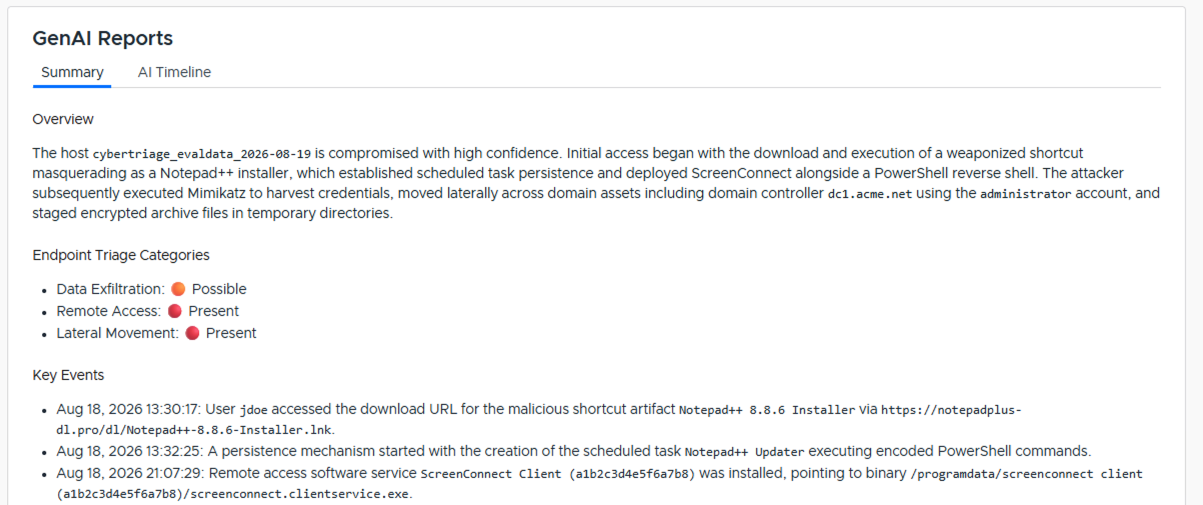
A host- and incident-level summary is created based on the items scored as bad or suspicious. These need details of your bad and suspicious artifacts.
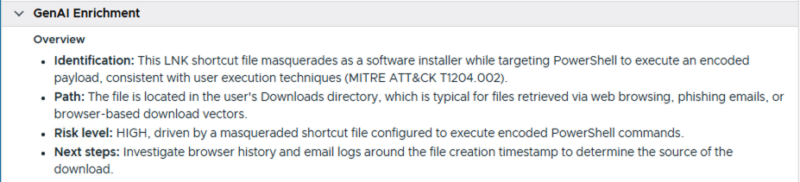
Each item can also be enriched to provide more information about it. This is visible on the right-hand side of the application:
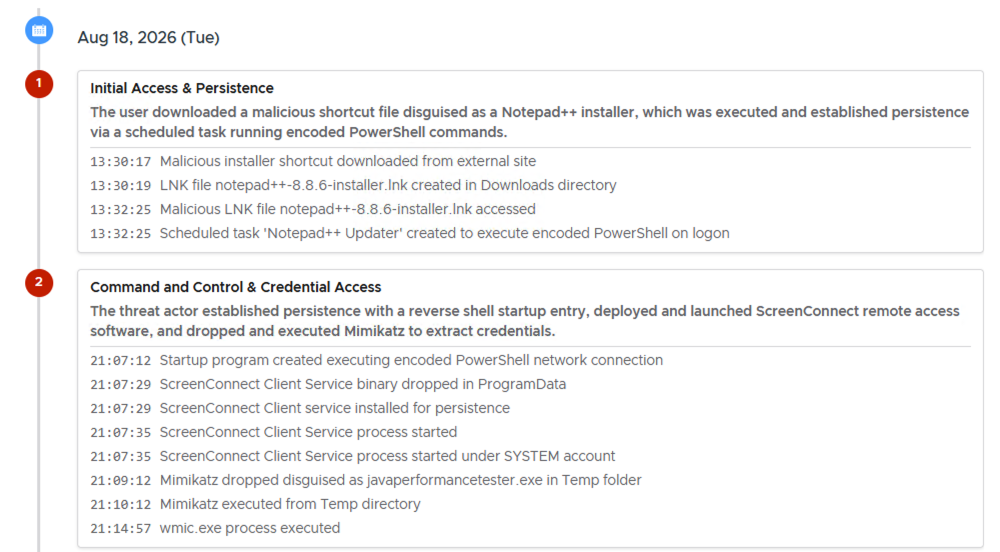
4.1 adds a variation of the summary with an AI-generated timeline based on bad and suspicious items.
Two Key Concepts in AI Systems
Before we dive into specific data flows, it’s important to define the key elements in an AI system.
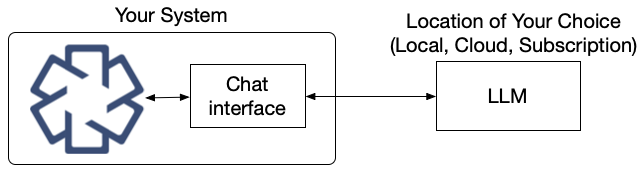
- Who’s Prompt: All LLMs are driven by a prompt. For example, “Create a summary based on these items…”. Some systems have their own internal hard-coded prompts and others allow the user to create one (such as a chat interface).
- LLM Location: LLMs can run on hardware from an AI model creator, on cloud services that host models, or locally.
AI Data Flow in Cyber Triage
Cyber Triage has two AI concepts in 4.0:
- Embedded prompts using cloud-based LLMs (new feature)
- MCP Server (existing feature)
Embedded Prompts
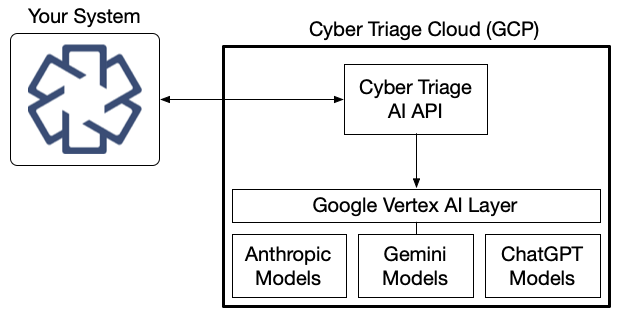
The main 4.0 feature is that Cyber Triage issues prompts to create the summaries and artifact enrichment. The LLMs are located in GCP (Google Cloud) behind our APIs.
In 4.1, you will be able to use your own LLMs.
MCP Server
If you use the MCP Server feature (released in 3.17), you are in control of both the prompts and the LLMs. Cyber Triage provides only data. With MCP, you can use LLMs from a commercial subscription with an AI provider, from your cloud provider, or a local model.
What Data Goes into the Cyber Triage Cloud
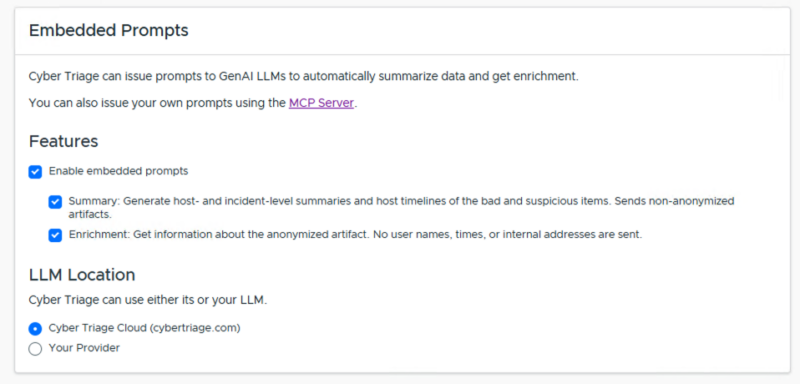
When you use the LLMs in the Cyber Triage Cloud, data is uploaded from your Cyber Triage installation for each prompt (i.e., each request for enrichment or a summary). The data sent depends on the type of request, which is why you can enable each type independently.
Our goal is to send minimal and anonymized information whenever we can.
Enrichment Requests
Enrichment requests use anonymized metadata from an artifact. Before upload, the software removes user names, internal host names, IPs, and other indicators from paths, titles, etc. Full content is not uploaded.
You can think of these queries like threat intelligence: “What do you know about this PowerShell command…?” The exact user, host, time, etc. are not needed to understand what the command does, and many users will have the same generic request.
Summary Requests
Summary requests also upload metadata from each artifact, but it is not anonymized and includes fields like timestamps and host names. Our goal is that the output of these requests could be used directly in a final report (after verification, of course).
Example
Here is an example of how the enrichment versus summary upload data are different. These are properties for a file that gets flagged as suspicious in our evaluation data set.
| Property | Enrichment | Summary |
|---|---|---|
| Path | /users/<user>/downloads/notepad++-8.8.6-installer.lnk | /users/jdoe/downloads/notepad++-8.8.6-installer.lnk |
| Analysis Results / Scores | Included (example: “LNK file had long target path”) | Included (same as Enrichment) |
| SHA256 Hash | Included | Included |
| OS Account | Not included | ACME/jdoe |
| File Dates | Not included | 2026-08-18T13:30:19Z, etc. |
The notable differences between the two is “<user>” instead of the user’s name in the path and the identifying information about dates and account are not in the enrichment.
What Happens to Data in the Cyber Triage Cloud
Once data enters our cloud, it is sent to one or more LLMs in the Google Vertex framework. Within Vertex, we are using Gemini, but we could change models over time as their capabilities change.
The Google Vertex framework runs models within GCP, so no data is sent back to the model provider. Vertex is separate from the public Gemini servers.
We are not using “grounding,” which would allow Gemini to perform Google searches to enhance results.
Because enrichment requests are anonymized and more generic, we store those requests and responses for possible caching. The idea is that if you are seeing the same exact Windows process or Google Update BITS job that someone else saw in the past, we would re-use that previous result (much like how malware scanning works when you query by hash).
NOTE: As of Nov 20, 2026, we have not implemented caching. Every request is processed by the LLM.
The basic takeaway of what gets stored:
- Summaries: Nothing is stored, and models can’t use the data for training.
- Enrichment: Anonymized requests and responses are saved for possible future caching. Models cannot use the data for training.
Enabling or Disabling the Embedded Prompts
If you want to disable the embedded prompts, you have two options:
- Globally: In the options panel, you can turn the prompts off for all incidents. By default, both prompt types are on. You can disable one or both of the prompt types. (NOTE: 4.0 used the term “Native AI”. 4.1 uses the term “Embedded Prompts”.)
- Per incident: When you create an incident, if AI is enabled in the options panel, you can choose to enable or disable it for that incident.
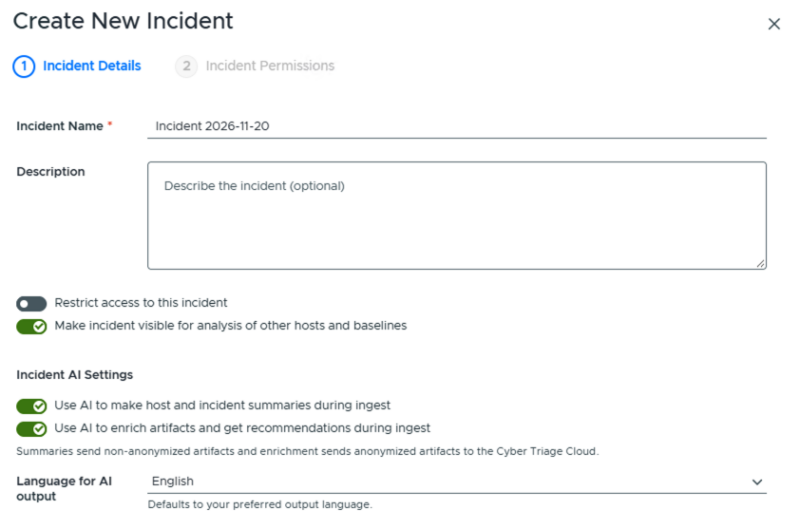
In 4.0, if you open an incident created in v3 and change scores while AI is enabled, the summary will be updated using AI. In 4.1, we are changing that behavior, since you did not have a chance to enable or disable AI for that specific incident.
The User Manual can be found here.
4.1 Allows for Your Own LLMs
Cyber Triage 4.1 allows you to use your own local LLMs, your own Anthropic or OpenAI subscription, or a cloud service such as AWS Bedrock or GCP Vertex. The same data described above is sent, and enrichment requests will still be anonymized.
Please Reach Out
Our goal has always been to make you as efficient as possible in your investigations. That is our goal in bringing in AI, and we want to make sure you have control of your data. If you have any questions, please send them to support.