
DFIR Collections Before Patching: Forensic Triage Under CISA BOD 26-04
CISA announced a directive (BOD 26-04) for US agencies to collect data from systems before they patch specific vulnerabilities. This guidance is consistent with how to respond at machine speeds when AI-enabled attacks are possible: get possible evidence as soon as possible before it goes away.

CISA has recently tagged several vulnerabilities in the Known Exploited Vulnerabilities (KEV) to direct agencies to collect first, including the PHP2Shell ones in October.
As agencies are assessing if their SOC capabilities comply with the directive and identifying solutions to fill the gaps, we wanted to expand on what it looks like to satisfy these requirements and where Cyber Triage® can help when the impacted systems are Windows.
Preserve and Collect Evidence
Step 2 of CISA’s implementation guidance states that within 2-24 hours of the vulnerability being added to KEV, that data from impacted systems should be collected:
- “Do not alter or remediate systems prior to evidence/artifact collection when possible.”
- “Due to time constraints, do not collect data beyond the incident/alert scope.”
- “Prioritize immediate acquisition of volatile data.”
How Agencies Can Quickly Collect
As you plan out how to meet this directive, there are several key concepts that you should think about:
- Platform: Vulnerabilities can impact any platform: Windows, Linux, macOS, networking devices, and cloud. Collection methods for each will vary. Make sure you have a plan for each platform in your environment.
- Launch Method: Understand how you are going to launch the collection. For endpoints, you need to have a deployment method to collect at scale. Some DFIR collection tools proactively install agents (such as Velociraptor) and others build on your existing agents (such as Cyber Triage). For devices in smaller numbers, manual collections may suffice.
- Collection Scope: The CISA directive outlines that analysis of the data needs to include system access, lateral movement, persistence, and data exfiltration. Those data artifacts are stored throughout a system.
- Some collection tools focus on a static set of files and volatile data, which can miss forms of persistence and data exfiltration. You may need to go back to collect files that were missed.
- Others are adaptive and go beyond the static set of files to collect additional ones that are referenced by artifacts (such as startup and process executables). This is the best approach to getting as much relevant data as possible in one collection.
- Others take a full image, but that is too slow for this use case.
- Destination: You need to have a place for this data to go. Some tools save only to a local file, others can upload to cloud storage (S3, etc.), and others have their own network service.
How The Cyber Triage Collector Achieves This
The Cyber Triage Collector helps agencies meet the collection steps on Windows systems.
The Collector tool comes with Cyber Triage and runs on target systems to collect critical data. Let’s compare it with the key concepts from above:
- Platform: The Collector runs on all versions of Windows (XP SP1 and beyond).
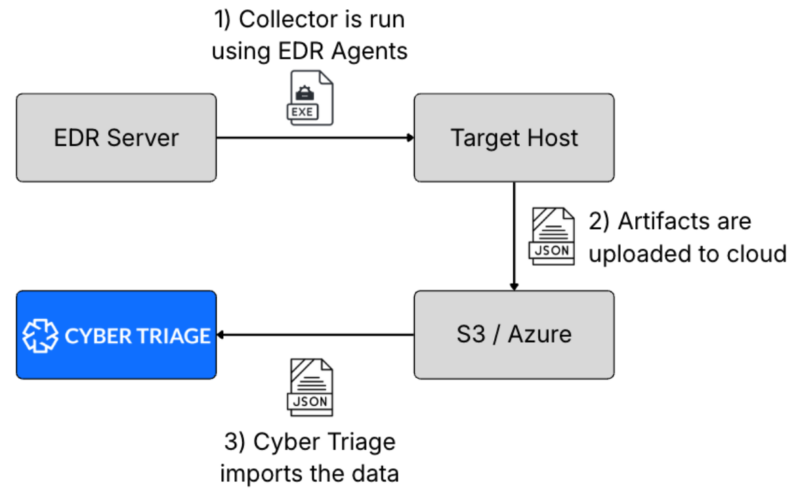
- Launch Method: The Collector is non-persistent and can run from within EDR agents, deployed via PowerShell, or manually launched. It’s a single EXE file and is very easy to deploy.
- Collection Scope: The Collector covers the needed artifacts and is adaptive. It starts with a set of rules (hives, logs), then parses them to collect the target EXEs and scripts. This gets you the best balance between only known logs and a full image. The Collector collects volatile information about running processes and will soon collect memory from specific processes.
- Destination: The Collector can save files locally to be pulled back for analysis, feed the collection results directly into the Cyber Triage application, or upload them to S3 storage (including GovCloud).
For example, here is a data flow in Cyber Triage where the Collector is deployed via an EDR and the results are saved to cloud storage.
Triage Analysis
Step 5 of CISA’s guidance is about analyzing the collected data to see if a compromise occurred. This can happen after patching or in parallel to it. The guidance was to have this performed within 24 to 48 hours of the vulnerability being added to KEV.
According to CISA, the goals of the analysis are to look for:
- Unauthorized access to systems, accounts, or data
- Threat actor access or presence
- Lateral movement from initial access vector or system identified above
- Persistence mechanisms
- Data staging and/or exfiltration
How Agencies Can Quickly Triage
As you plan out how to meet this directive, there are several key concepts that you should think about:
- Automation: The analysis needs to be automated to ensure you can get it done quickly and for all of the impacted hosts. Manual review to decide what to parse and look for anomalies will not scale.
- Scope: The analysis needs to cover all of the data sources that represent access, logins, persistence, and data exfiltration. This includes telemetry, event logs, and other artifacts.
- Identify Bad Artifacts: The analysis needs to detect the ‘known’ methods, such as those that can be detected with hashes, Yara, or Sigma rules. They also need to be able to use sandboxing and other malware analysis techniques that detect malicious behavior.
- Identify Suspicious Artifacts: The analysis needs to detect suspicious behavior that could either be novel techniques or attackers trying to blend in. This is critical because attackers (and AI) change their patterns either to avoid detection or because the AI is trying random things.
How Cyber Triage Meets This Directive
Cyber Triage helps agencies meet the Step 5 triage goals on Windows systems when it analyzes the Collector output and EDR telemetry.
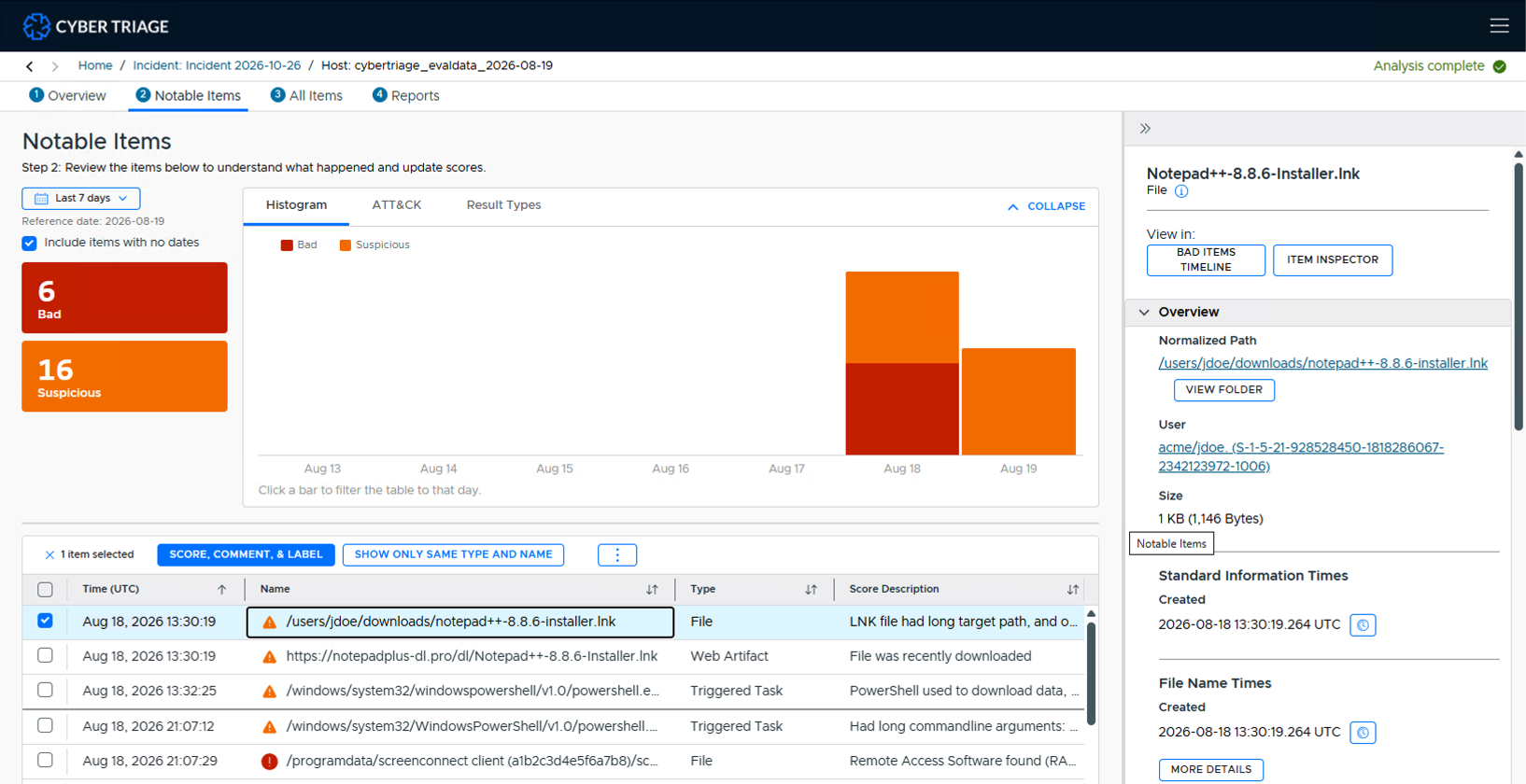
- Automation: Cyber Triage automatically normalizes the ingested data, scores it as bad or suspicious, and summarizes the results with no manual interaction. You can then review and dive deeper. Scoring uses a combination of deterministic and AI techniques.
- Scope: Cyber Triage has long focused on the same core areas as the CISA requirements: unauthorized access, lateral movement, persistence, and data exfiltration.
- Identifying Bad Artifacts: Cyber Triage scores items as bad based on 40+ malware scanning engines and its own rules and heuristics. This can be performed in airgapped environments and by querying for exact match or fuzzy match hashes.
- Identifying Suspicious: Cyber Triage scores items as suspicious based on living off the land techniques and other abnormal behaviors.
This is Cyber Triage giving you an overview of what its automated triage analysis found.
Fast Collection and Analysis with Cyber Triage
The new CISA directive matches what other enterprises are doing, which is to make sure they get a rapid collection of data ASAP so that machine speed attacks can be quickly cleaned up. If you are looking to improve the collection and triage capabilities of your SOC on Windows platforms, then try out Cyber Triage.
Cyber Triage is an AI-powered investigation platform that empowers responders to rapidly investigate intrusions. It automatically gathers all relevant data, guides you through the evidence, and gets your whole team working together for fast and comprehensive DFIR.
Cyber Triage uses 3 key concepts for fast and comprehensive investigations:
- Ingest: Access evidence from multiple sources for a comprehensive investigation.
- Guide: Immediately find the evidence that matters with automated scoring and recommendations.
- Collaborate: Work together via a shared DFIR workspace that connects your team and your tech.
Contact Us for a demo or try out a free 7-day evaluation.